
Web Panel
Web panel info
Domain Name Theft & Hijacking: 5 Essential Steps to Protect Your Registrar Account
In today's hyper‑connected world, a domain name is a vital asset that cybercriminals constantly target, making robust protection essential. By choosing a reputable registrar, hardening credentials, enabling domain‑level safeguards, monitoring activity, and training staff, you can keep your digital real‑estate secure and maintain full control over your online presence.
“Seamless Integration: How to Embed JetBackup 5 Client Portals Directly into Your WHMCS Client Area”
Embedding JetBackup 5’s self‑service portal directly into the WHMCS client area gives hosting providers a friction‑free, branded backup experience that cuts support tickets and opens upsell opportunities. This guide walks you through installing the official JetBackup addon, crafting a custom WHMCS template with an iframe, and using a secure WHMCS hook to generate time‑limited portal URLs—all while keeping security tight and the integration future‑proof.
Mastering CloudLinux Node Rebalancing: A Step‑by‑Step Guide for Multi‑WHM Bare Metal Environments
Managing a fleet of WHM/cPanel servers with CloudLinux can feel like juggling flaming torches, but automated node rebalancing turns that chaos into a well‑orchestrated performance symphony. By evenly redistributing LVE cages across bare‑metal nodes, you maximize hardware ROI, maintain consistent CPU and memory allocation, and free your team from tedious manual migrations.
Boost Your Site’s Performance: Configuring CloudLinux mod_lsapi for Maximum PHP Speed vs. Standard PHP‑FPM
When running a high‑traffic shared‑hosting site on CloudLinux, choosing the right PHP handler can dramatically impact performance. This guide compares LiteSpeed’s mod_lsapi and the traditional PHP‑FPM, detailing how each architecture affects latency, throughput, and memory usage, and provides step‑by‑step tuning tips to unlock maximum PHP execution speed.
Mastering LiteSpeed: Step‑by‑Step Configuration for a Multi‑cPanel Master‑Slave Environment
Running multiple cPanel servers in a master‑slave setup dramatically boosts scalability and uptime, and adding LiteSpeed Web Server injects event‑driven speed, built‑in caching, and seamless cPanel integration. This guide walks you through installing and syncing LSWS across all nodes, ensuring a synchronized, high‑performance environment that delivers lightning‑fast page loads and robust redundancy.
Step‑by‑Step: Automatically Clean a Hacked WordPress Site Using Imunify360
Learn a step‑by‑step guide to scan, auto‑repair, and harden a compromised WordPress site using Imunify360’s automated tools.
Mastering Imunify360: Proactive Defense Setup to Block Zero-Day PHP Exploits
Protect your PHP sites from zero‑day attacks with Imunify360 Proactive Defense, an automated shield that uses machine learning and real‑time threat intelligence to block exploits before they reach your code. This guide walks you through installing the solution, fine‑tuning WAF rules, restricting risky PHP functions, and continuously testing to ensure a resilient, performance‑friendly defense.
Mastering LiteSpeed Crawler in cPanel: A Step‑by‑Step Guide to Instant Page Pre‑Caching
In today’s digital landscape, website speed is essential for engagement, SEO, and conversions. By enabling the LiteSpeed Crawler via cPanel, you pre‑cache pages on LSCache, eliminating cold‑start delays and delivering instant, lightning‑fast load times to every visitor. This simple, proactive setup boosts performance, reduces server load, and keeps your site ready for traffic spikes.
How to Resolve High Server Load and TTFB Spikes with LiteSpeed’s WebAdmin Console
Managing a high‑traffic site feels like juggling flaming torches—one misstep and performance plummets. With LiteSpeed’s WebAdmin Console, you can instantly spot soaring server load and TTFB spikes, fine‑tune worker processes, enable LSCache, and automate alerts, turning a sluggish server into a lean, responsive machine in just a few iterations.
Complete Configuration Guide: How to Set Up LSCache and Redis Object Caching in cPanel
Discover how pairing LiteSpeed Cache with Redis object caching on a cPanel‑managed server can slash page‑load times, boost SEO, and reduce server strain. This guide walks you through installing LiteSpeed, configuring LSCache, setting up Redis, and fine‑tuning both layers for peak performance and scalability.
The Ultimate Guide to Zero-Downtime Server Migration in cPanel
Master the art of seamless infrastructure upgrades with our comprehensive guide to zero-downtime cPanel server migrations. Discover how to leverage WHM's built-in tools, execute strategic delta syncs, and manipulate DNS TTLs to move live environments without a single visitor noticing.
How to Deploy Node.js and Python Apps Using Podman in cPanel
Discover how modern cPanel and Podman containerization eliminate the historical headaches of deploying Node.js and Python applications in shared hosting environments. This step-by-step guide explores how to leverage native runtime tools, rootless containers, and automatic proxy routing for seamless, secure web deployments.
How to Stop Layer 7 DDoS Attacks Using Cloudflare and cPanel
Discover how to effectively neutralize sophisticated Layer 7 DDoS attacks by combining Cloudflare's global edge-filtering capabilities with granular server-level controls in cPanel/WHM. This comprehensive guide outlines a powerful dual-layer defense strategy to protect your web applications from resource exhaustion, botnets, and downtime.
The Ultimate WHM Email Authentication Guide: Mastering SPF, DKIM, and DMARC
With strict new security requirements from inbox giants like Google and Yahoo, properly authenticating outgoing mail on your cPanel/WHM server is no longer optional. Master the "Holy Trinity" of email security—SPF, DKIM, and DMARC—to protect your server's IP reputation, prevent disastrous blacklisting, and ensure your messages consistently reach the inbox.
cPanel 138 & The Meridian Interface: What’s New in the Shift from Jupiter
Discover how cPanel 138 revolutionizes web hosting with the brand-new Meridian interface, replacing cluttered legacy menus with sleek, task-focused workflows. Complete with intuitive built-in AI assistants to handle troubleshooting and configurations, this major update makes server management faster, smarter, and more accessible than ever before.
How to Fix High Server Load and Slow Queries in WordPress
Discover how to safeguard your high-traffic WordPress site from server crashes and slow load times by mastering database optimization and multi-tiered caching. This guide provides actionable steps to diagnose slow queries, clean up bloated database tables, and implement advanced tools like Redis and Memcached.
The Ultimate WooCommerce Speed Blueprint: Server-Level Tweaks for High-Traffic Stores
Discover how to bulletproof your high-traffic WooCommerce store against sluggish load times and traffic spikes with advanced server-level optimization strategies. This comprehensive guide explores crucial performance tweaks, including PHP and database optimization, modern web server architectures, and edge caching to ensure lightning-fast checkouts.
Why Is My WordPress Site Down? 5 Quick Diagnostics Before You Panic
Discovering your WordPress site is down can trigger immediate panic, but most downtime issues can be resolved quickly with a calm and methodical approach. By running through five simple diagnostics—from checking error messages and testing global status to backtracking recent updates—you can pinpoint the problem and get your site back online.
The Ultimate cPanel Security Guide: Step-by-Step Hardening for Admins
Discover how to effectively harden your cPanel environment with this comprehensive security blueprint, designed to protect your server infrastructure from brute-force attacks, unauthorized access, and emerging cyber threats. Learn essential strategies ranging from enforcing multi-factor authentication and leveraging advanced firewalls to implementing robust backup and monitoring routines.
Is Your Server Exposed? A Step-by-Step Guide to Revoking API Tokens
Discover how to quickly identify exposed servers, effectively revoke compromised API tokens, and harden your organization's multi-user access controls. This guide provides a step-by-step incident response playbook and actionable strategies to secure your digital infrastructure against modern threat vectors.
Hardened PHP and WordPress Speed: How to Secure Your Site Without Sacrificing Performance
Discover how to maintain rigorous server security without sacrificing site speed by optimizing WordPress on a hardened PHP stack. This article explores essential strategies—including OPcache fine-tuning, targeted function whitelisting, and advanced object caching—to help you achieve the ideal balance between robust protection and lightning-fast performance.
Secure Your WordPress Site Without Plugins: Server-Level Hardening Guide
Discover how to secure your WordPress website without the performance drag of bloated plugins. By leveraging native server rules, strict file permissions, and REST API access controls, you can build a lightning-fast digital fortress using zero PHP resources.
How to Fix WordPress Downtime: A Step-by-Step Troubleshooting Guide
Experiencing WordPress downtime can induce panic, but a systematic approach makes diagnosing and fixing the issue straightforward. This guide walks you through essential troubleshooting steps, from identifying error messages to resolving database conflicts, memory limits, and faulty plugins.
How to Fix cPanel/WHM Update Failures: A Step-by-Step Troubleshooting Guide
Stalling cPanel/WHM updates caused by repository metadata errors and broken dependencies can leave your server vulnerable and frustrated. Fortunately, a systematic command-line approach to cleaning caches, resolving conflicts, and re-running updates can safely restore your hosting environment.
The Ultimate Guide to Securing Multi-Tenant Servers and Shared Hosting
Discover essential strategies for hardening shared hosting environments against multi-tenant threats. This guide explores advanced OS-level isolation, leveraging CageFS for user virtualization, and enforcing strict API permission controls to safeguard user data. Master these proactive techniques to secure your infrastructure and prevent cross-account compromises.
Securing the AI Frontier: How Imunify360 Blocks Malicious Bots at the OS Layer
As the digital landscape shifts toward autonomous AI agents and advanced scrapers, traditional application-layer security is often no longer enough to protect web infrastructure. By leveraging Imunify360 at the operating system layer, system administrators can intercept malicious bots, control file access, and block resource-heavy scrapers before they impact server performance. This defense-in-depth approach provides the ultimate shield for modern websites facing increasingly complex automated threats.
Shared Hosting Survival Guide: How to Isolate PHP-FPM Memory Leaks
Discover how automating PHP-FPM resource pools can eliminate single-point-of-failure risks in shared hosting. This guide explores how process isolation and automated provisioning stop runaway memory leaks from crashing your entire server infrastructure.
How to Achieve Sub-500ms TTFB on Multi-Tenant WordPress Servers with LiteSpeed
Master the art of high-performance web hosting by learning how to tune LiteSpeed Web Server and LSCache for WordPress. This practical configuration guide provides step-by-step instructions to eliminate resource contention and achieve a consistent sub-500ms Time to First Byte (TTFB) on busy multi-tenant servers.
Beyond Passwords: Securing WHM/cPanel with Hardware-Bound MFA and Zero-Trust Access
Discover how to secure your WHM and cPanel environments against modern cyber threats by implementing a Zero-Trust architecture. This guide explores moving beyond legacy passwords and static API keys by enforcing phishing-resistant, hardware-bound multi-factor authentication and adopting dynamic, scoped access controls.
Critical CVE-2026-67402 Advisory: How to Secure ConfigServer Firewall and Block Apache-Level RCE
Discover how to identify, mitigate, and patch CVE-2026-67402, a critical zero-day remote code execution vulnerability affecting the MESSENGER service in ConfigServer Security & Firewall (CSF). This emergency advisory provides a step-by-step remediation guide and forensic checklist to secure your Linux environment against potential system compromise.
The SysAdmin’s Guide to Zero-Day Patching: Emergency cPanel & WHM Update Strategies
Discover how to safeguard your cPanel and WHM environments against critical zero-day vulnerabilities with rapid emergency response protocols and command-line patching strategies. This guide equips system administrators with the essential tools, such as the `/scripts/upcp` command, to instantly secure server infrastructure and mitigate breach risks.
AI Agents in WHM: Revolutionizing cPanel Troubleshooting with Natural Language
Discover how artificial intelligence and natural-language diagnostics are revolutionizing WHM server administration. By replacing raw log parsing with semantic search, AI agents enable administrators to proactively resolve account telemetry errors, DNS misconfigurations, and stubborn mail issues through conversational problem-solving.
From Prompt to Production: How cPanel AI and MCP Streamline App Deployment
Discover how cPanel's embedded AI and native Model Context Protocol (MCP) Server are revolutionizing web development by eliminating the traditional deployment gap. This powerful integration allows developers to seamlessly transition from AI code generation to live server deployment using natural language, all without leaving their preferred coding environment.
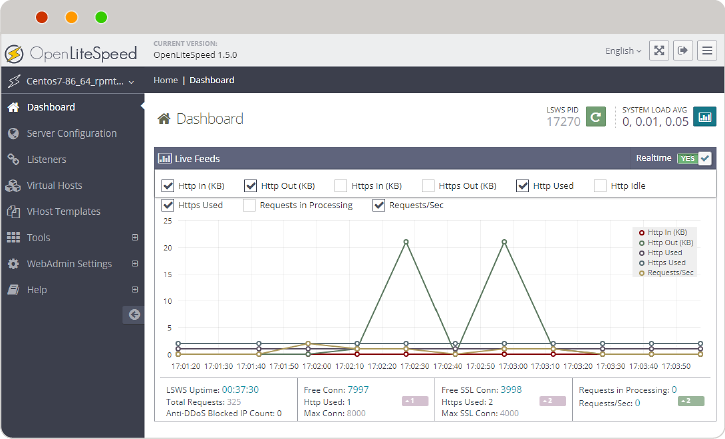
How to Install LiteSpeed Web Server: A Step-by-Step Guide for Beginners
Discover how to supercharge your website's speed and security by migrating to LiteSpeed Web Server. This comprehensive, step-by-step guide walks you through server preparation, installation, Apache integration, and performance verification to help you optimize your hosting environment effortlessly.